Configuring a LACP link aggregation, EtherChannel, or port-channel, or Eth-trunk between a Huawei and a Cisco switch is something very common. But since the configuration syntax between the two vendors is different, it can be confusing.
In this article, I will show how to configure a LACP port-channel – called Eth-trunk on Huawei – properly between a Cisco Catalyst switch running IOS or IOS-XE and a Huawei switch, model 6700 in this case.
Here is the topology:
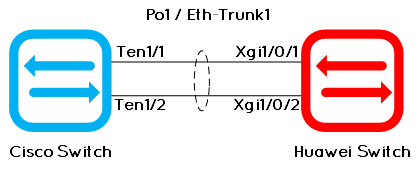
To add more interesting information, let’s say we want to let only VLANs 10 and 20 transit on this link.
Basic Cisco configuration
! --- First, cleanup the existing configuration on interfaces ten1/1 and 1/2:
default int range ten1/1-2
!
! --- Then, configure the port-channel, in shutdown:
int range ten1/1-2
shut
channel-group 1 mode active
!
! --- Configure the port-channel itself:
interface Port-channel1
 description --- LACP to Huawei Switch
 switchport
 switchport trunk allowed vlan 10,20
 switchport mode trunk
!
! --- Finally, unshut the interfaces:
int range ten1/1-2
no shut
end
Basic Huawei configuration
# --- First, clear the existing configuration on the pyhsical interfaces:
int range xgi1/0/1 to xgi1/0/2
clear configuration this
shut
#
# --- Then, configure the eth-trunk:
eth-trunk 1 mode active
desc --- LACP to Cisco Switch
# Note: a description, or other configuration, must be written AFTER the eth-trunk configuration line. Otherwise a warning message says the interface configuration is not empty so it's not possible to configure an eth-trunk.
#
# --- Configure the port-channel itself:
interface Eth-Trunk1
 desc --- LACP to Cisco Switch
 port link-type trunk
 port trunk allow-pass vlan 10 20
 mode lacp
# Depending of the software version or switch model, the "mode lacp-static" command is necessary.
#
# --- Finally, undo shut the interfaces:
int range xgi1/0/1 to xgi1/0/2
 undo shut
#
More options and troubleshooting
This is the basic configuration. Below, you can find more options and some troubleshooting commands for Cisco and Huawei switches:
LACP priority
We can have up to 8 physical ports into one logical LACP link. But we can configure more than 8 ports in hot-standby. Then, to choose what port(s) are members of the logical link and what port(s) are in hot-standby, we must use the LACP priority. Remember: the lower priority wins!
Cisco:
interface ten1/3
 lacp port-priority <0-65535>

Huawei:
interface xgi1/0/3
 lacp priority <0-65525>
Remark: on some Huawei switches, like the S2700SI for example, the maximum physical ports of a logical LACP link is four.
Load-balancing method
The load-balancing method must be changed depending on the network topology. On a Cisco switch, the mode you select applies to all EtherChannels that you configure on the switch. On Huawei, it can be different per eth-trunk:
Cisco:
port-channel load-balance {src-mac | dst-mac | src-dst-mac | src-ip | dst-ip | src-dst-ip | src-port | dst-port | src-dst-port}
(This list varies depending on the platform)

Huawei:
int eth-trunk 1
 load-balance {dst-ip | dst-mac | src-ip | src-mac | src-dst-ip | src-dst-mac}
(This list varies depending on the platform)
Troubleshooting
There are many points to check if the EtherChannels do not come up, from the physical interfaces up to the LACP protocol. I will list here only the most common problems:
1. Check the physical interfaces:
Cisco: show int ten1/1
Huawei: dis int xgi1/0/1

2. Check the status of a link aggregation group:
Cisco: show int po1
Huawei: display eth-trunk 1

3. Check the member interfaces of an EtherChannel interface:
Cisco: show int po1 etherchannel and show etherchannel details
Huawei: display trunkmembership eth-trunk

4. Debugging of LACP packets:
Cisco: debug lacp packet
Huawei: debugging trunk lacp-pdu
cisco is active, why huawei one is”eth-trunk 1 mode active”? typo or what concept?
Hi Devik,
Thank you for your comment.
In this example, both sides are active, this one of the possibilities; But you can also make one side active and one just listening, or both sides active, or both sides forced, depending on the use-case.
I hope I answered your question.
Kind Rgds,
Jerome
in huawei config you forgot to add ethtrunk 1 to interfaces.
Hi Vyacheslav,
Thank you for your comment.
If you look well, I add the ethtrunk to the interface at the beginning:
int range xgi1/0/1 to xgi1/0/2
clear configuration this
shut
#
# — Then, configure the eth-trunk:
eth-trunk 1 mode active
Kind Rgds,
Jerome